
Run 3
Race through space tunnels in Run 3, an HTML5 browser platformer. Free online game, no download required, with fullscreen toggle and unblocked games support.
Introduction to Run 3
Play Run 3 online and jump straight into a fast, focused endless runner built for instant fun in your browser. It is a slick browser platformer and a lightweight HTML5 game, so it loads quickly, runs smoothly, and is ready whenever you are. The best part? It is a free online game with no download required, so you can start a run in seconds.
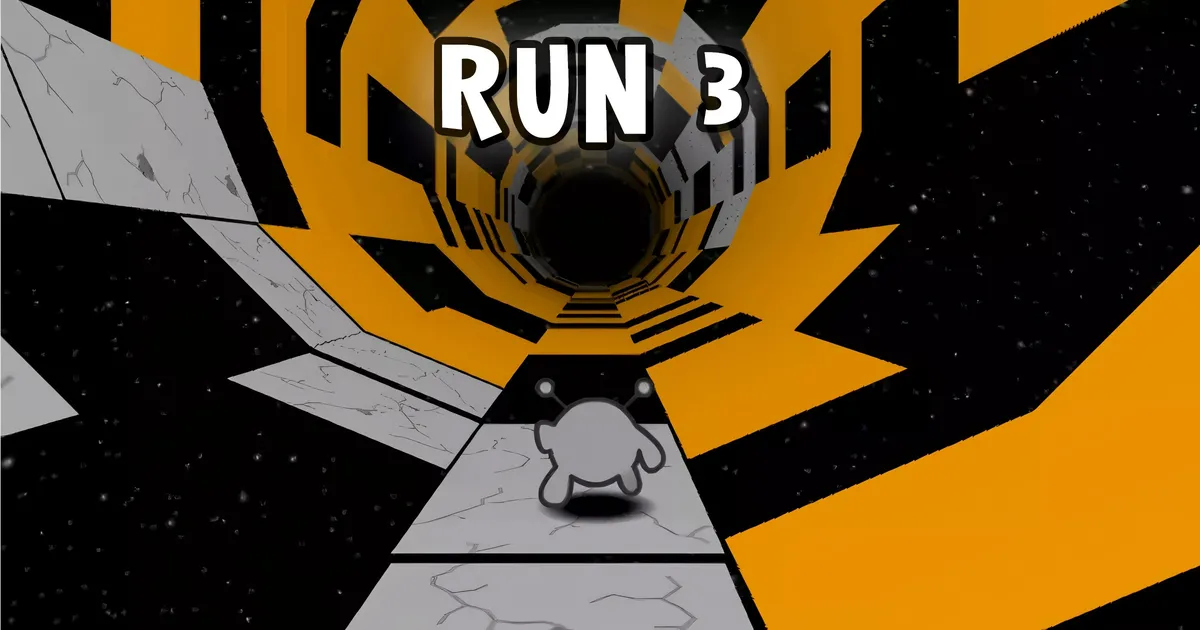
You sprint through a twisting space tunnel that wraps around you like a cylinder. Floors become walls, walls become ceilings, and gaps appear right when you think you are safe. In Run 3, timing is everything, and the tunnel never stops asking for quick reactions and smart decisions.
Whether you have thirty seconds or thirty minutes, Run 3 fits. It rewards short sessions, but it is deep enough to master. Expect a gentle start, then a steady ramp-up as the tunnel fires tougher patterns at your reflexes. With practice, Run 3 turns panic into flow.
Start Here
Setup & Launch
Open the game page, wait a moment for the assets to load, and hit Play. That is it. Run 3 launches instantly in most modern browsers. If you want a bigger view, tap the fullscreen toggle under the game window for a cleaner, distraction-free run. Need a quick break? Pause, step away, then slide right back into the tunnel.
If the game feels choppy, close extra tabs, enable hardware acceleration in your browser, and make sure your connection is stable. Run 3 is tiny, but a smooth start helps you settle into rhythm. If audio is loud, lower the volume from your system controls or the site’s settings panel.
Core Rules & Systems
The core idea is elegantly simple: do not fall into space. You dash forward inside a rotating cylinder, and you can pivot the world by moving left or right. That is the gravitational hook that makes this gravity platformer special. In Run 3, rotating the tunnel is how you create a new floor when the old one disappears.
Tiles come in various types, including stable blocks, crumbling platforms, and moving segments. Some sections open into yawning gaps that beg for a well-timed jump. The space tunnel keeps scrolling, so you are always choosing between a safer path and a faster line. The more you learn the patterns, the longer you survive.
How to Play Run 3
Movement is tight and snappy. Use your keyboard controls to steer, jump, and recover when the floor vanishes. In Run 3, you steer along the inside of the cylinder, tilt to rotate the world, and hop gaps at the last moment. Small adjustments make big differences, so micro-taps beat heavy presses most of the time.
Watch a few tiles ahead, not just your feet. You will start threading sequences of rotations and jumps together, like beats in a song. When it clicks, Run 3 feels smooth, and you will surprise yourself with how far a clean rhythm carries you.
Gamepad / Controller
This is a keyboard-first game. Officially, controllers are not required and may not be supported on every site. Some players map a gamepad through third-party software, but the native feel is on keys. If you do try a controller with Run 3, keep dead zones small and sensitivity low to avoid over-rotating the tunnel.
Difficulty Options
There is no classic easy or hard toggle. Instead, difficulty rises naturally as layouts become trickier and faster. Different characters can subtly shift how forgiving a run feels. In Run 3, early stages are generous, then the tunnel starts mixing crumbling tiles, tighter jump windows, and faster turns to raise the challenge.
Modes & Variants
You can chase distance or explore progression. The endless path amps up the speed and complexity the longer you last, while exploration offers structured routes with branching levels to beat. In Run 3, both flavors serve different moods, and swapping between them keeps the experience fresh.
Beginner’s Guide to Run 3: First Steps and Fast Wins
Start with small goals: survive to the next checkpoint, clear a tricky gap, or nail a clean corner rotation. Keep your first runs short and focused, then extend your sessions as confidence grows. In Run 3, quick restarts teach faster than long grinds, so embrace resets and learn one obstacle at a time.
Mastering Gravity Rotations: Stay on the Walls, Not in Space
Rotate early, not late. When you see a gap on the floor, tilt toward a nearby wall and use it as your new ground. It is the heart of Run 3 and the magic behind its wall running mechanics. Aim to land on the top or side panels with a slight angle so you can chain another rotation cleanly.
Explore Mode vs. Infinite Mode: Pros, Cons, and Goals
Explore Mode offers curated challenges and branching progress, great for learning tile behaviors and conquering specific hurdles. Infinite Mode is a pure distance chase, a classic endless runner loop built for flow and score hunting. In Run 3, use Explore to practice and Infinite to test your limits.
Characters Explained: Runner, Skater, and More Playstyles
Different characters change how you approach tricky lines. Some handle tighter turns, some glide with momentum, and others can sneak through gaps more safely. In Run 3, try a few and see which timing style fits your reflexes. Faster styles reward aggressive play; steadier rigs help you survive longer routes.
Precision Controls: Keyboard Shortcuts and Timing Windows
Clean inputs beat frantic mashing. Tap to correct, hold to commit. Small midair nudges can save a fall. In Run 3, master your keyboard controls so movements feel automatic. Landings have narrow timing windows, and jumping a fraction earlier can be stronger than a perfect edge jump if you are rotating at the same time.
- Move left or right: Arrow keys or A and D
- Jump: Up Arrow or W or Space
- Restart the current attempt: R (if available on your host)
- Pause: P (if available)
- Mute: M (varies by site)
Advanced Movement: Corner Hops, Wall Slides, and Gap Clears
Corner hops are tiny jumps taken just before a tile ends, letting you keep momentum while rotating onto a side panel. Light wall slides happen when you graze a wall and jump out cleanly. In Run 3, these advanced touches help you glide through ugly layouts, rescue scuffed landings, and carry speed across wide gaps.
Hazards 101: Crumbling Tiles, Holes, and Moving Platforms
Crumbling tiles vanish a moment after touch, so plan your route before you land. Holes demand a rotation plus a jump, not just one or the other. Moving platforms call for patience and precise timing. In Run 3, hazards stack, so learn how each behaves alone before tackling combined patterns.
Route Planning: Branching Paths, Maps, and Checkpoints
When routes split, pick the side with more stable tiles and fewer blind turns. Sometimes the longer way is safer and yields a bigger payoff later. In Run 3, checkpoints in structured levels let you practice a tough sequence until it sticks, then you can stitch the whole route together without fear.
Ready to push further? Keep experimenting, switch characters when a section feels off, and remember that this is a nimble HTML5 game designed for quick retries and steady skill growth. With patience and rhythm, Run 3 turns the impossible into routine.
Solo vs. Multiplayer
On the surface, Run 3 is a solo gauntlet of timing, precision, and problem-solving. But there's a hidden social layer. Race against your own ghosts, share seeds, compare clear times, and challenge friends with the same level routes. Communities post custom challenges and unofficial leaderboards, which turns a personal run into a friendly rivalry. It’s single-player at its core, yet the competitive angle keeps you pushing for cleaner lines and sharper recovery after risky jumps.
If you crave a multiplayer feel, try asynchronous competitions. Pick a segment, record your best attempt, and trade replays. You’ll learn fresh lines, see bold skips, and pick up small optimizations to make Run 3 feel brand new day after day.
Run 3 Features
The appeal of Run 3 comes from its gravity-bending tunnels and dynamic routes. Each corridor adds new twists, tighter turns, and creative platform obstacles to test your adaptability. The level design mixes quick reflex checks with thoughtful path choices, so every clear feels earned. The campaign expands steadily, then throws clever variants your way to keep things unpredictable.
Challenge levels raise the stakes with narrow landings, rotating segments, and sudden gaps. For explorers, branching paths invite reroutes and clever detours. Prefer mastery? Loop your favorite stage until your movement feels buttery smooth. The game supports both approaches, making Run 3 just as welcoming to casual adventurers as to veterans who want consistent gold splits.
Heroes & Skills
Different characters change how Run 3 plays. One hero might accelerate quickly but require precise inputs to keep momentum. Another could glide longer, giving you more time to plan a safe landing. Some are agile at cornering tight bends, while others forgive late jumps with a steadier fall. Switching heroes lets you tailor a route to your strengths or tame stages that gave you trouble earlier.
Stuck on tricky platform obstacles? Try a character with better lateral control. Practicing with multiple heroes builds a versatile toolkit, which pays off when challenge levels demand niche movement options. Your choice matters—pick the right runner for the job, and sticky sections turn approachable.
Items & Power-Ups
Across the campaign, you’ll spot key pickups and collectibles that unlock routes, characters, or minor boosts. Grab them during safer stretches so you don’t break your rhythm. In some levels, you’ll find paths that trade difficulty for better loot. Riskier platforms may hide valuable items that help later. Learning when to detour pays dividends in the long run, especially if you’re aiming to 100% the game.
Smart item timing also supports speedrun strategies. A quick extra hop or shortcut can align your movement cycle with moving floors, eliminating slow downs. That tiny edge compounds across stages—and makes Run 3 feel incredibly satisfying once your routes click.
Saving & Continuing
Progress matters, so safeguard it. Many builds of Run 3 store data in local cookies or local storage. Keep your browser tidy, but avoid wiping site data for the game. If the platform supports accounts or cloud sync, enable it to save progress across devices. It’s wise to back up saves before major browser updates, too.
Switching devices? Export if the site supports it, then import on the new machine. That way your unlocked heroes, cleared challenge levels, and achievements stay intact.
Points & Rewards
Your points reflect clean movement, consistent clears, and collectible routes. Levels often reward smart pacing more than reckless speed. Aim for steady lines and think ahead: the best scorers reduce unnecessary jumps, keep momentum through corners, and make deliberate landings. Over time, your totals rise as muscle memory locks in and your routes stabilize in Run 3.
Run 3 Options & Accessibility
Options can transform your experience. Adjust graphics quality to help with performance optimization, reduce motion-heavy elements if you’re sensitive to visual flow, and tune audio to highlight subtle cues. Small tweaks—like lowering effects detail or simplifying backgrounds—can help you read platform obstacles at speed. If the platform offers color settings, use them to distinguish hazards and safe landings at a glance.
Run 3 Fullscreen Mode
(press Fullscreen button under the game window)
Fullscreen cuts distractions and unlocks smoother focus. On a laptop, it also creates more vertical space for line-of-sight, making long gaps easier to judge. If your cursor slips out of the play area when windowed, fullscreen helps keep inputs locked in place and makes Run 3 feel tighter and more responsive.
Collectibles & Progress: Power Cells, Stars, and Achievements
Power Cells and Stars mark your mastery. Use them to unlock heroes, routes, or bonus stages if supported by your host site. Achievements guide you toward techniques you might ignore otherwise—try a no-fall clear, collect every pickup in a route, or perfect a tricky section. These goals add structure to free play and turn routine clears into intentional practice in Run 3.
- Plan your route: grab easy collectibles first, then chase the risky ones.
- Use safe resets: if a run scuffs early, restart fast and stay in rhythm.
- Log your progress: track which stages still need all pickups so you don’t forget.
Speedrunning Run 3: Gold Splits, Consistency, and Setup
Speedrunning boils down to clean inputs and repeatable lines. Build your route piece by piece. Focus on one segment until it’s stable, then chain it with the next. Aim for consistent clears before chasing flashy skips. When timing locally, use clear start/stop rules and keep notes on movement cycles. Your personal best will reflect the work you put in.
- Setup: keep a single browser profile for runs to avoid background tasks.
- Consistency: practice micro-tech—short hops, buffered inputs, and corner cuts.
- Gold splits: push only one section at a time, then move on to avoid burnout.
Want extra speedrun strategies? Study replays to spot new approaches. Sometimes a tiny camera angle change reveals a faster wall line. Stay curious, and Run 3 will keep giving you time saves.
Performance Boosts: Reduce Lag and Smooth Out Frame Drops
Stutters can ruin flow. Apply these lag fix tips to keep runs smooth:
- Close extra tabs and apps. Free up CPU and memory for Run 3.
- Lower graphics settings in the site options, if available.
- Use a modern browser with hardware acceleration enabled.
- Switch to fullscreen for fewer OS notifications and better focus.
- On laptops, plug in for better performance and stable clocks.
- Clear cached data occasionally, but don’t wipe cookies if they store saves.
For deeper performance optimization, disable heavy extensions, use a clean browser profile for gaming, and keep drivers updated. Smooth frames mean steadier timing and better clears.
Safe Play at School or Work: Unblocked Access Explained
Many players discover Run 3 through unblocked games portals. If you’re on a school Chromebook, access depends on local policies. Always follow rules. If gaming is allowed during breaks, use trusted educational-friendly portals that host ad-light versions. Avoid shady mirrors; they can be slow and risky. When in doubt, ask for approved sites.
On a managed network, content filters may block game URLs. If you’re permitted to play, bookmark whitelisted portals for faster access later. Stability matters—reliable hosts deliver smoother performance and preserve your save progress across sessions.
Mobile Play Guide: Touch Input, Data Use, and Battery Tips
Run 3 runs well on many phones via mobile browser gaming. Touch controls are responsive if your device is modern and your browser is up to date. For smooth play, switch to fullscreen, rotate to landscape if supported, and disable auto-brightness so the screen doesn’t dim mid-run. Reduce haptic spam and background syncing to save battery.
- Touch input: keep thumbs light; quick taps prevent oversteer on tight corners.
- Data use: cache the page on Wi‑Fi before heading out to limit mobile data.
- Battery: lower brightness, close background apps, and consider low-power mode.
If your phone warms up, take short breaks. Heat can cause throttling and micro-stutter, which throws off timing in Run 3. A simple cooldown keeps performance stable and your lines consistent.
Accessibility Tweaks: Contrast, Color Modes, and Input Options
Everyone benefits from clear visuals. If the platform offers color modes, pick palettes with high contrast to separate floors, walls, and hazards. Some builds let you tone down flashes or reduce background clutter. Customize inputs too: remap keys or adjust sensitivity if available. These small changes help you read platform obstacles faster and react more confidently in Run 3.
Fullscreen Immersion: Why and How to Toggle It Right
Fullscreen is more than a cosmetic switch. It locks focus, stabilizes frame pacing, and can reduce accidental clicks outside the window. Toggle via the site’s control or your browser’s Fullscreen shortcut. If your cursor escapes the frame when windowed, fullscreen cures that instantly and makes Run 3 feel snappier.
- Use it for precise lines over long gaps.
- Combine with lower effects for a cleaner look.
- On ultrawide monitors, center the view to avoid eye strain.
Saving Your Progress: Cookies, Cloud, and Backup Tricks
Protecting your run history is easy with a few habits. First, verify where Run 3 stores data: cookies, local storage, or a linked cloud account. If cookies carry your save progress, exclude the site from cleaning tools. When cloud is available, log in on each device to sync clears and collectibles automatically.
- Backup: export saves when possible before reinstalling your browser.
- Versioning: after updates, confirm your data loaded before playing.
- Portability: on shared devices, use a separate profile to avoid accidental wipes.
If you switch between a desktop and a school Chromebook, plan ahead. Keep a safe copy of your latest data and test a quick import on the new device. That way, your achievements and challenge levels remain in place when you return.
Finally, remember that steady habits beat perfect tools. Keep your setup clean, stay mindful of performance, and revisit routes with fresh eyes. With a bit of care, Run 3 becomes a reliable, fast, and endlessly replayable favorite—whether you’re hunting PBs, collecting everything, or just enjoying a few quick tunnels between classes.
Performance & Troubleshooting
When Run 3 hesitates, stutters, or fails to start, a few quick checks usually get you back into the space tunnel. The game is an html5 game running in your browser, so small tweaks to the environment can deliver big performance optimization gains. Keep calm, take a breath, and try the steps below one by one.
- Close extra tabs and heavy apps. Run 3 benefits when your device has free memory and CPU headroom.
- Update your browser. Modern engines handle WebGL better, which keeps wall running mechanics smooth and responsive.
- Toggle hardware acceleration. In Chrome or Edge, turning it on or off can be a surprising lag fix tip for some setups.
- Use the fullscreen toggle. Fullscreen locks focus and can reduce background UI redraws, helping frame time stability.
- Disable extensions temporarily. Ad blockers, script filters, or recorders may interfere with an html5 game canvas.
- Try a different browser. If you are on an older build, switching to Chrome, Edge, or Firefox can resolve oddities fast.
- Clear cache and site data. A fresh load can fix corrupt assets that stop Run 3 mid-boot.
- Check WebGL status. On devices with stricter policies, enabling WebGL is necessary for this browser platformer to render.
- Reduce display scale. High-DPI monitors and OS-level scaling can cost frames. Slightly lower scaling may help.
- Plug in your laptop. Power saver modes can throttle GPU clocks, which affects a gravity platformer with fast camera motion.
If you are on a school chromebook, performance policies may be locked. Run 3 still runs well on most models, but if you notice hiccups, try closing tabs and switching to a simpler theme. And remember, keyboard controls are smoother when the device is not overloaded by background tasks.
One more tip: if your run feels floaty after a long session, reload the page to refresh timers. Canvas-based games can drift over many minutes. A quick refresh often makes Run 3 feel crisp again.
Play Run 3 Unblocked
Many players want to enjoy Run 3 during breaks where unblocked games are allowed. Because the game is a free online game with no download required, it is friendly for shared devices and public networks. If you are on a school chromebook and the page is allowed, simply open the game, hit the fullscreen toggle for focus, and play.
If you hit a block screen, follow local rules. Avoid sketchy mirrors or VPN tricks. The safest route is always the official host your school permits. Ask a teacher or admin to whitelist the game when appropriate. Run 3 is lightweight, classroom-friendly, and quick to pause, so it is well suited for short sessions when access is granted.
Mobile & Tablet Play
On phones and tablets, Run 3 supports mobile browser gaming smoothly. The game detects touch controls automatically, so you can jump and steer without a keyboard. Rotate to landscape for better visibility, and consider lowering your device brightness to keep temperatures and battery drain in check during long sessions.
If gestures interfere, disable browser swipe-navigation or use an immersive mode. Touch input is precise, but the space tunnel moves fast, so it helps to keep your thumbs ready near the edges. You can pull off the same wall running mechanics on a touchscreen once you get the rhythm down. On some devices, enabling fullscreen and turning off battery saver will make Run 3 feel closer to its desktop smoothness.
Offline Play Availability
Run 3 is designed for the web, so it generally needs an active connection to load assets and levels. Once the page is open, you might be able to continue for a while if the assets are cached, but offline reliability is not guaranteed. If you plan to play on a commute, load the game first while online, then avoid refreshing the page.
Progress uses local storage, so you can save progress without an account. Keep cookies and site data intact if you care about your records. Clearing your cache or using aggressive privacy tools can wipe save data. For peace of mind, avoid private browsing when you want your runs to persist.
Is Run 3 Safe?
Run 3 is safe to play in a modern browser. It is a free online game, so there is no need to download installers or run executables. That alone cuts out the biggest risks. Still, use common sense when you explore unblocked games hubs. Stick to reputable hosts, ignore pop-ups that promise boosters, and never install random extensions for cheats. The game itself runs in a sandboxed tab, and you control what data is stored locally.
- No download required means no installer risks.
- Keep your browser updated for the latest security patches.
- Be mindful of third-party ads; avoid clicking on unrelated banners.
- Use the fullscreen toggle from within the game UI, not from unknown overlays.
If you are playing on a shared device, log out of any personal accounts and consider a guest profile for extra privacy. Run 3 will run just fine without extra permissions.
Similar Games to Run 3
If you crave the same flow, a few titles capture similar energy with different twists on platform obstacles, momentum, and skill expression. Each one rewards patience and movement mastery.
- Slope: A blazing downhill endless runner with tight turns and escalating speed. Great for honing reaction time.
- Tunnel Rush: Another space tunnel experience with bold visuals that will test your peripheral awareness.
- Vex series: Precision platforming gauntlets with trap-laden maps and clean physics.
- Geometry Dash: Rhythm-driven jumps and spikes that punish hesitations but feel amazing when you sync.
- OvO: Nimble movement puzzles where every input counts, ideal if you enjoy timing and short, sharp stages.
- Run 2: A classic predecessor that showcases early ideas leading to the refined feel in Run 3.
Daily Challenges You Can Try to Keep It Fresh
Want to keep your sessions lively without grinding the same route? Mix in daily challenges. Little constraints unlock big fun and help you grow.
- Edge hugger: Spend an entire stage glued to walls, practicing those wall running mechanics under pressure.
- One-and-done: Beat two challenge levels in a row with zero retries. Learn to scout platform obstacles on the fly.
- Zen speed: Sprint through three stages without pausing the game. Perfect for refining speedrun strategies and pacing.
- Minimalist view: Play a session without fullscreen toggle. Then play the same route in fullscreen to feel the contrast.
- Left-hand day: Remap or mentally swap keyboard controls to strengthen ambidextrous input.
- Phone focus: Do a mobile browser gaming run using touch controls only, chasing a new personal best.
Rotate these ideas through the week. They turn warm-ups into targeted practice and make Run 3 feel new daily.
If You Like Run 3, Try These Similar Titles
- Slope 2: Faster slopes with new twists on line selection and momentum control.
- Cluster Rush: Leap across moving trucks in a frantic, timing-heavy gauntlet.
- Tunnel Glider: A slick gravity platformer vibe with smooth banking in tight corridors.
- Subway Surfers: A touch-first endless runner that is perfect when you are away from a keyboard.
- Powerline and Light Trails modes in arcade hubs: Great for reaction training between runs.
These picks echo that satisfying flow while giving your brain fresh patterns to decode.
Quick Fixes When the Game Won’t Load or Crashes
- Hard refresh the tab to force asset reload. This often revives an html5 game stuck mid-load.
- Open an incognito window. Extensions are disabled by default, reducing conflicts.
- Disable every nonessential extension, then retry. Add them back one at a time.
- Turn hardware acceleration on or off to test. It is the fastest stability toggle for many setups.
- Switch browsers. Some GPUs work better with Chrome; others prefer Firefox or Edge.
- Check network filters if you are on a school chromebook. If a domain is blocked, ask for an approved route.
- Reduce monitor refresh rate temporarily. Some mismatched rates cause odd canvas behavior.
- Restart the device. A clean boot clears memory fragmentation and resets drivers.
If none of that works, try another network to rule out filtering or time-based blocks. Most loading glitches resolve with one of these lag fix tips.
FAQ: Short Answers to Common Beginner Questions
- Is Run 3 an endless runner or level-based? Both. Adventure maps feel level-based, while Infinite modes play like an endless runner.
- Do I need to install anything? No. It is a web-first experience with no download required.
- How do I save progress? The game uses local storage to save progress automatically on the device and browser you are using.
- What are the default controls? Keyboard controls use arrows or WASD to move and jump. On mobile, touch controls appear on screen.
- Can I play fullscreen? Yes. Tap the fullscreen toggle under the game window for an immersive view.
- Is this a browser platformer or a pure runner? It blends both, using platform obstacles inside a fast, flowing tunnel.
Summary
With a few thoughtful tweaks, Run 3 runs smoothly almost anywhere. Use performance optimization basics, lean on the fullscreen toggle for focus, and keep your environment clean of heavy extensions. On a school chromebook, follow local access rules; the game is a free online game, so when it is allowed, it is quick to start and just as quick to pause. On mobile, touch controls make short bursts simple and fun, while desktop keyboard controls deliver maximum precision.
If you are hungry for more, fold in daily challenges, practice speedrun strategies, and sample similar titles to widen your skills. Whether you are chasing a personal best or mastering tricky challenge levels, the space tunnel awaits. Run 3 rewards rhythm, patience, and clever movement. Dive back in, trust your timing, and glide past those platform obstacles like you were born to do.
Run 3 Gameplay Video
Frequently Asked Questions
What are the controls in Run 3?
Use keyboard controls: Left/Right to move and Up/Space to jump. Master wall running mechanics in this gravity platformer and endless runner set in a space tunnel.
Can I play Run 3 on a school Chromebook?
Yes. It’s an HTML5 free online game and browser platformer with no download required. Access on unblocked games sites depends on your school Chromebook policy—play only where allowed.
Is Run 3 good on phones and tablets?
Yes, it works for mobile browser gaming. Many versions include touch controls for moving and jumping; if available, use the fullscreen toggle for better visibility.
How do I save progress and continue later?
Your run and unlocked challenge levels usually save to local storage. Keep the same device and browser to save progress, or sign in if the host site offers accounts.
How can I reduce lag and improve my time?
Try performance optimization and lag fix tips: close extra tabs, enable hardware acceleration, use fullscreen toggle, and lower effects. Practice speedrun strategies to clear platform obstacles faster.
What are the controls in Run 3?
Use the Arrow keys to move left/right and Up or Space to jump. Master wall-running in this gravity platform game set inside a space tunnel.
Can I play Run 3 on a school Chromebook?
Yes. It’s an HTML5 free online game with no download required. Access on unblocked sites depends on your school’s policy—only play where permitted.
Is Run 3 good on phones and tablets?
Yes, it works for mobile browser gaming. Many versions include touch controls; if available, use the full screen toggle for better visibility.
How do I save progress and continue later?
Your progress usually saves to the browser’s local storage. Use the same device and browser, or sign in if the host site offers an account.
How can I reduce lag and improve my time?
Try performance optimisation tips: close extra tabs, enable hardware acceleration, use full screen, and lower effects if the version provides settings. Practise routes to clear obstacles faster.
Is Run 3 free to play?
Yes—Run 3 is a free HTML5 browser game. Some hosts display adverts, but no purchase is required to play.
What’s the difference between Infinite Mode and Explore Mode?
Infinite Mode is an endless run focused on high scores, while Explore Mode is level-based and lets you unlock new paths and characters as you progress.
How do I unlock new characters and levels?
Advance through Explore Mode and complete in-game objectives. Some versions unlock extra characters or routes after you beat certain levels.
Does Run 3 support controllers or gamepads?
It’s designed for keyboard controls. Some browsers may map gamepads, but support varies—keyboard is the most reliable.
Can I play Run 3 offline or without Wi-Fi?
Most versions need an internet connection to load. After loading, some may continue briefly offline, but features can be limited.